Enterprise and datacenter
Recovery of very large volumes
ZFS pools, large NAS and SAN volumes, and file systems of hundreds of terabytes. With in-house software that splits the recovery into three processes.
Recovery
Hard disk and SSD HDD, SSD, external drives, flash cards RAID, NAS & SAN All levels, all controllers, virtualisation Smartphones and tablets iPhone, Android, iPad, Huawei Tapes LTO, DAT, DLT and older formats
Access after signing in.
EN · RU · ZH · ES
Enterprise and datacenter
ZFS pools, large NAS and SAN volumes, and file systems of hundreds of terabytes. With in-house software that splits the recovery into three processes.
A volume of hundreds of terabytes cannot be treated like one big hard drive. The data is spread over dozens of drives, the file system keeps its structure in trees and references that are themselves scattered across the volume, and with copy-on-write systems such as ZFS and Btrfs several versions of the same structure often exist side by side.
Ordinary recovery software tries to read and understand such a volume in one go. At this size it runs into limits of time, memory or the amount of intermediate results.
File systems and volumes that grow to hundreds of terabytes, such as:
Not sure whether your system qualifies? Contact us with the details of your setup.
The main strength of Three-Tier Recovery is its ability to process very large storage volumes without trying to reconstruct the entire file system in one operation. On volumes of hundreds of terabytes, the amount of raw data is only part of the problem: the software must also process very large numbers of file-system structures, references and candidate fragments.
This matters most with tree-based copy-on-write (CoW) file systems such as ZFS and Btrfs. In ZFS the structure is literally a tree of block references (block-pointer tree); Btrfs uses a different on-disk format, with its own tree roots, B-tree nodes, extents and generation information. What they share: a change does not overwrite the existing structure, but writes new tree nodes and data blocks and creates new references. As a result, blocks belonging to different generations of the file-system tree may remain present on the storage at the same time.
Find (process 1, see below) scans the source for the building blocks of the file system and reduces hundreds of terabytes of raw storage to a much smaller set of relevant structures. Depending on the file system, these include:
The challenge is not only to find these structures, but to determine which structures belong together. Link (process 2) then works primarily on those findings, much smaller than the original volume, and sorts, groups and connects them using information such as tree hierarchy, parent and child references, object or inode identifiers, block addresses and extents, transaction or generation numbers, checksums, timestamps and the relationships between different copies or generations.
This makes it possible to distinguish structures belonging to different file-system states and to reconstruct a consistent tree from the available material. The expensive scan of hundreds of terabytes is thereby separated from the much smaller problem of sorting and reconstructing what was found. Save (process 3) finally reads the data belonging to the reconstructed files and consolidates it onto the destination storage.
Three-Tier Recovery does not treat all file systems alike. The three stages (Find, Link, Save) remain the same, while the structures being recognised and linked are specific to each file system.
For ZFS this includes structures such as labels, uberblocks, transaction groups (TXG), block pointers, dnodes and indirect blocks. Btrfs uses a different on-disk format, with its own tree roots, B-tree nodes, extents and generation information. The architecture is shared; the recognition is file-system-specific.
That is why we developed our own software, which splits the recovery into three consecutive processes:

We scan the volume for the building blocks of the file system: nodes, fragments and snippets of metadata and data, wherever they are.
The pieces found are mapped, chained, stitched and sorted (mapping, chaining, stitching, sorting) until the structure of folders and files adds up again.
The reconstructed files are consolidated and transferred to the target storage.
Why this way: by splitting the recovery into three processes, no single process has to hold the whole volume at once, and each one delivers its own result that the next builds on.
The three processes run in our own software, Three-Tier Recovery. A coordinator distributes the work and keeps the keys found in memory; the actual processing is done by workers, per process: Find workers scan the volume, Link workers join the pieces together, Save workers write out the files.
A monitor shows the progress of a case at any moment:
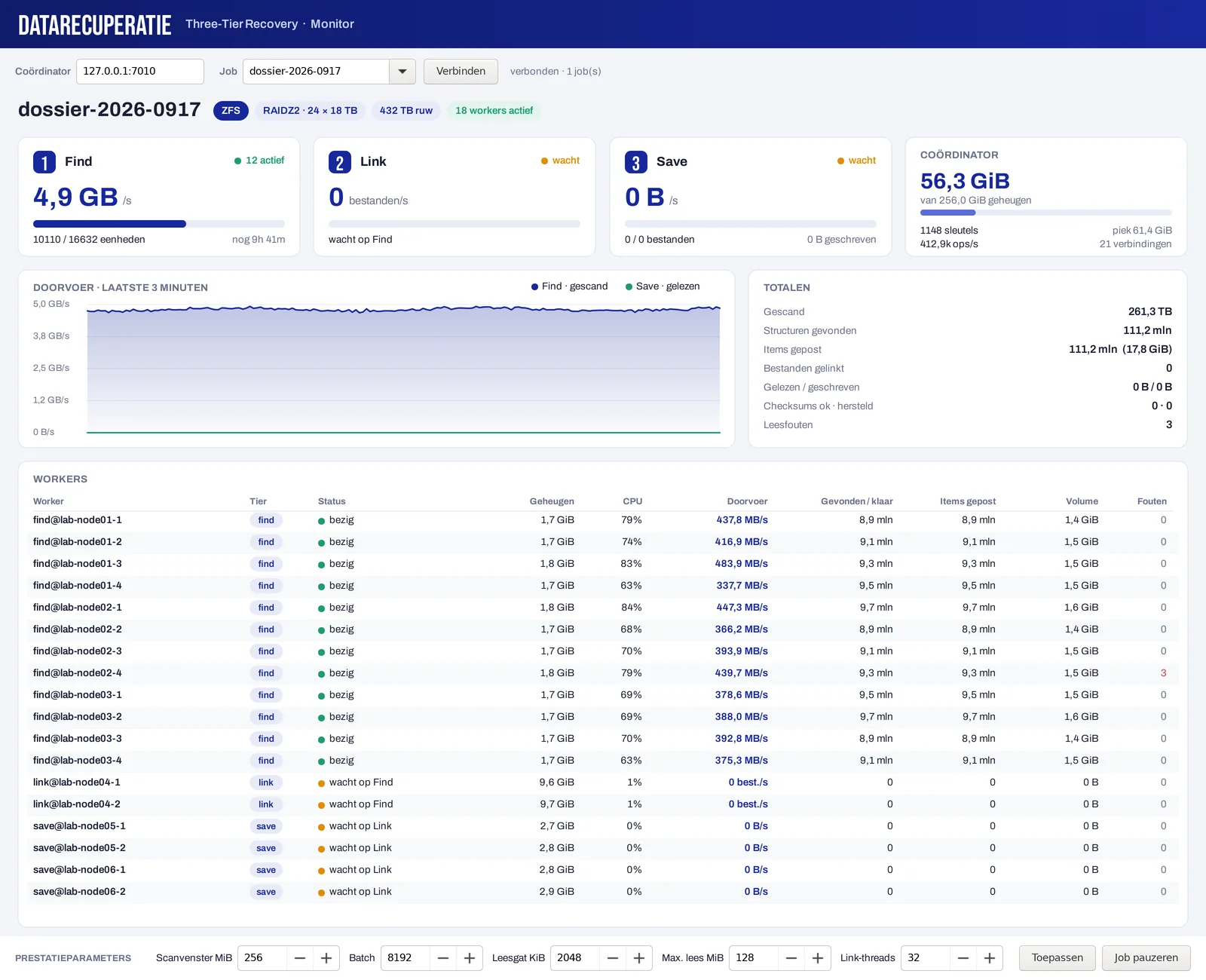
Performance parameters such as the scan window, the batch size, the maximum read size and the number of link threads can be changed while a job is running, and a job can be paused. That way we match the load to the condition of the drives and the machines available.
For file systems with checksums, such as ZFS, the software verifies the checksums of the data read and keeps count of how many blocks were fine and how many were repaired.
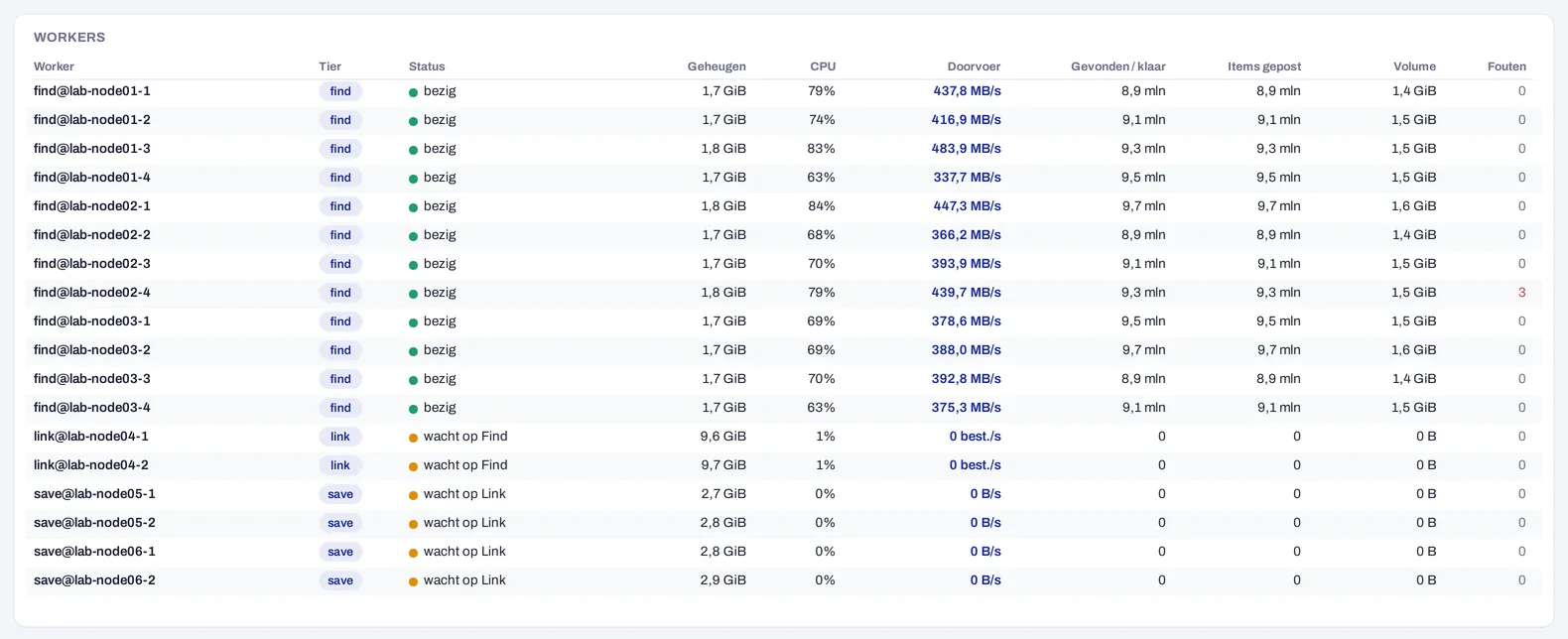
The workers do not have to run on one machine. Scanning is spread across several nodes, each processing part of the volume. For a volume of hundreds of terabytes we deploy as many workers as the case needs, and monitor each one separately.
ZFS never overwrites existing data (copy-on-write); it writes new versions and points to them from a tree of block pointers. At the top is always the most recent state of the pool. If that is damaged, for example by a failed drive, an import error or a power cut, the pool often refuses to import, while the data itself is still there.
Because ZFS does not immediately overwrite older versions of its structure, a recovery can often fall back to an earlier, consistent state. That is exactly the kind of search the first process is for.
Every disk in a ZFS pool has four labels: two at the start and two at the end. Each label holds a ring of uberblocks, and each uberblock points to the state of the pool after a transaction group (TXG). The active state is the valid uberblock with the highest TXG number.
Because ZFS is copy-on-write, the blocks that older uberblocks point to often remain untouched for a while. An older, consistent TXG can thus become the starting point of the reconstruction.
Something different from the three processes, but often in the same case: setups where data sits in several layers stacked on top of each other. For example:
If one of those layers is damaged, we use the information from the other layers to reconstruct it. For example, the file system inside a partition reveals where that partition started and ended, the structure inside a virtual disk helps put its fragments in the right order, and the internal layout of a database makes it possible to join separate pieces back together.
All about multi-layer recovery →
Partitioning: GPT keeps a backup copy of the header and partition table at the end of the disk. And even without a partition table, the boot sector or superblock of a file system reveals where a partition starts.
Deduplication: the data is stored as unique chunks, with an index that determines which chunks together form a file. If that index is damaged, the structure of the layer above, such as a virtual disk or a file system, helps to reorder the chunks.
Application files: an Exchange database (ESE) consists of fixed-size pages, each with its own checksum. That helps to recognise them among other data.
If the data may not leave the building, the recovery can also take place on your premises, with our mobile cleanroom cabinet.
Call us or request an analysis, with the layout of your system and what happened. Together we look at the best approach.
Interesting? Liked it? Share this post with your network!
Questions about your drive? An engineer is reading.